
 Douglas Strickland
How to Evaluate Utility Portals for New Service
The best utility customer portals let residents start service online from beginning to end: fill out the application, upload required documents, pay any deposit, and track the request until their account is active. Many portals stop well short of that. Residents can pay a bill online but still have to print a PDF, email a lease, or visit City Hall just to open an account.
To evaluate how well a portal handles new service, municipal utilities should work through six steps:
- Map your current new service process.
- Define resident self-service criteria.
- Evaluate the digital application forms.
- Check what happens after an application is submitted.
- Review account management, security, and accessibility.
- Plan implementation and adoption.
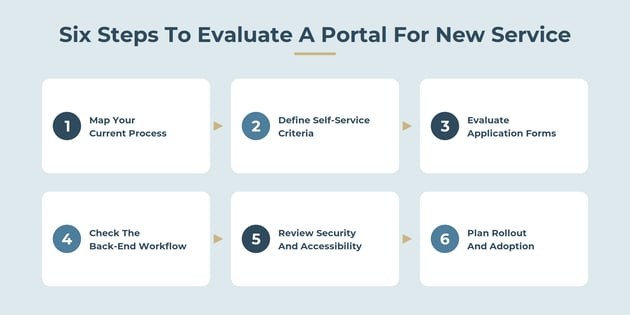
This guide walks through each step, with the customer portal features to look for and the questions to ask vendors. If you're also comparing payment features, see Best Municipal Utility Payment Portals Compared.
Why Do Online Service Applications Matter for Municipal Utilities?
Starting service is often a resident's first interaction with the utility, and it sets the tone for the relationship. It's also one of the most document-heavy requests customer service handles.
A typical new service application asks for:
- The legal name of every account holder on the deed or lease
- A Social Security number or federal tax ID
- The service address and billing address
- Email and phone contact information
- A signed lease, deed, or closing documents
- Photo identification
- A deposit, depending on the utility's policy
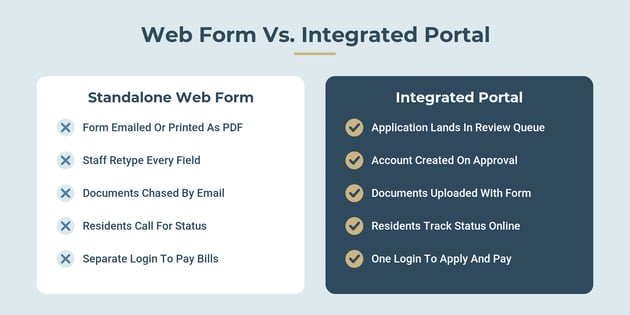
When that process runs on paper, email, or a standalone web form, staff re-key every field into the billing system, chase missing documents, and field calls asking whether the application went through. Online service applications built into the customer portal remove most of that work and give residents a faster, more predictable start.
Move-in season makes the difference obvious. A utility that processes dozens of new accounts a week can't afford to handle each one by hand.
Step 1: Map Your Current New Service Process
Before looking at any portal, document how a new account gets created today, from the resident's first contact to their first bill. This becomes the baseline you'll measure every portal against.
Capture:
- Every entry point. Phone, counter, email, PDF download, or a third-party web form.
- Every handoff. Who reviews the application, who verifies documents, who creates the account, and who schedules the meter read or turn-on.
- Every document and fee. What residents must provide and what they pay up front.
- Every delay. Where applications sit waiting, and how often staff have to follow up for missing information.
- Volume and timing. How many applications you process each month, and when the peaks hit.
Why it matters: A portal can only remove the steps you know about. Utilities that skip this step often buy a portal that digitizes the form but leaves the manual work behind it untouched. Your process map also becomes the foundation of a business case for replacing your billing software.

Step 2: Define Resident Self-Service Criteria
Good resident self-service means a resident can start service without calling, visiting, or emailing anyone. Turn that into criteria you can test during a demo:
- Start to finish online. Can a resident complete the entire application without printing or mailing anything?
- Works on a phone. Most residents applying for service are in the middle of a move. The form has to work on a mobile device.
- Clear requirements up front. Residents should see what documents and fees they need before they start, not after they submit.
- Save and return. Can a resident pause the application and finish it later?
- Status visibility. Can residents see whether their application is received, under review, approved, or waiting on something from them?
- Automatic confirmations. Email or text updates at each stage cut down on "did you get my application?" calls.
- One login going forward. The account a resident creates to apply should become the same account they use to pay bills.
Tip: Ask a few recent movers, or staff who handle new accounts, to walk through each vendor's demo form. They'll spot friction a project team might miss.
Step 3: Evaluate the Digital Application Forms
The application form is where most portals succeed or fail. Strong digital application forms collect complete, accurate information the first time.
Look for:
- Configurable fields. Your utility should be able to match the form to its own policies, such as owner vs. renter questions, commercial accounts, or co-applicants, without vendor development.
- Document uploads. Residents should be able to upload a lease, deed, or photo ID from their phone camera.
- Address validation. The form should match the service address to a valid premise in the billing system, so applications don't arrive for addresses you don't serve.
- Required-field checks. The form shouldn't accept an application that's missing information staff will need.
- Deposit and fee payment. Residents should be able to pay a deposit or connection fee as part of the application.
- E-signatures. Residents should be able to accept service terms digitally.
- Separate paths for different requests. Starting service at an existing connection is different from requesting a new tap or meter. The portal should keep those paths clearly separate so residents don't submit the wrong one.
Watch for: Portals that send applications to a generic inbox or produce a PDF for staff to retype. That is a web form, not a portal workflow.
Step 4: Check What Happens After an Application Is Submitted
The real test of a portal is what happens behind the scenes once a resident clicks submit. Ask each vendor to show the full workflow, not just the form:
- The application lands in a review queue inside the billing system, with uploaded documents attached.
- Staff review and approve with one click, or flag what's missing and notify the resident automatically.
- The customer account is created from the application data, with no re-keying.
- A service order is generated for the turn-on or meter read and sent to field staff, ideally to a mobile device.
- The first bill is set up with the correct rates, deposit, and proration based on the start date.
- The resident is notified that service is active and invited to set up paperless billing and AutoPay.
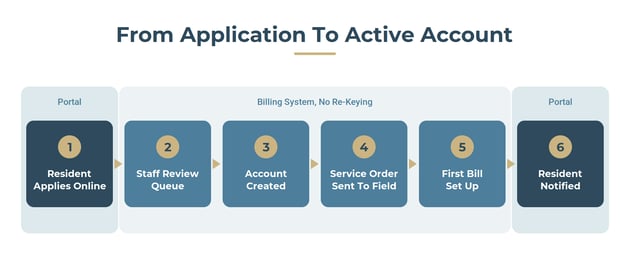
What to look for: An application that becomes an account and a service order without anyone copying data between systems. Every manual handoff is a place for errors and delays.
Questions to ask: How long does it take for an approved application to become an active account? Can staff see every pending application and its status on one screen?
Step 5: Review Account Management, Security, and Accessibility
New service is only the start of the resident's relationship with the portal. Strong utility account management keeps them using it for years.
Account management after move-in. Once service is active, residents should be able to view bills and usage, pay online, enroll in AutoPay and paperless billing, update contact details, manage multiple accounts, and submit service requests, all from the same login.
Security. New service applications collect sensitive information, including Social Security numbers and ID images. Ask vendors:
- How is personal data encrypted and stored?
- Is payment processing PCI DSS compliant?
- Who can view uploaded documents, and are views logged?
- How long are documents retained, and can retention follow your records policy?
Accessibility. A public-facing portal must serve every resident. Ask whether the portal meets WCAG accessibility standards, works with screen readers, and supports languages your community needs.
Step 6: Plan Implementation and Adoption
Even the best portal only helps if it's set up well and residents actually use it. Plan for these implementation considerations before you sign:
- Configuration. Who builds your application form, review rules, and notifications, and how long does it take?
- Data migration. Will existing customers' accounts, balances, and history be available in the portal on day one?
- Staff training. Customer service and field staff need to know how to work the new review queue and service orders.
- Website updates. Replace PDF applications and "call to start service" instructions on your website with a clear link to the portal.
- Resident outreach. Promote online service applications on bills, at the counter, on social media, and through landlords and real estate agents.
- A fallback path. Keep a phone and in-person option for residents who can't apply online, and have staff enter those applications through the same workflow.
Measure success after launch by tracking the share of new accounts started online, average time from application to active service, the number of incomplete applications, and the volume of start-service calls.

Customer Portal Features Checklist for New Service
Use this checklist to score each portal you evaluate. Rate each feature from 0 (missing) to 2 (fully supported).
|
Customer Portal Feature |
Why It Matters |
Vendor A |
Vendor B |
Vendor C |
|---|---|---|---|---|
|
Complete application online, no printing |
Removes paper, email, and counter visits |
|||
|
Mobile-friendly form |
Most applicants are mid-move and on a phone |
|||
|
Document upload (lease, deed, ID) |
Ends chasing documents by email |
|||
|
Address validation against service locations |
Stops applications for addresses you don't serve |
|||
|
Deposit and fee payment in the application |
Collects funds before service starts |
|||
|
Application status tracking for residents |
Cuts "did you get it?" calls |
|||
|
Staff review queue in the billing system |
Keeps every pending application in one place |
|||
|
Account created automatically on approval |
Eliminates re-keying and typos |
|||
|
Service order created automatically |
Speeds up turn-ons and meter reads |
|||
|
Same login for applying and paying |
Drives long-term portal adoption |
|||
|
PCI DSS compliant payments and secure document storage |
Protects sensitive resident data |
|||
|
Accessibility and language support |
Serves every resident in your community |
A portal that scores well on the first six features but poorly on the next four is a good web form, not an integrated portal. The biggest staff time savings come from the back-end workflow.
How MuniBilling Supports Resident Self-Service
MuniBilling's Customer Portal is built into the billing platform, so what residents do online connects directly to the accounts and workflows your staff use every day.
- Web and mobile access. Customer Portal 3.0 works in a web browser and as a mobile app.
- Self-service account management. Residents can view account details, manage their information, and make online payments without calling the office.
- Service requests from the portal. The service order module lets customers enter tickets and requests directly, with an audit trail of every activity.
- Secure payments. Portal payments are PCI DSS compliant, with merchant services available to simplify processing.
- Customizable notifications that keep residents informed.
- Implementation and training support through MuniBilling's implementation team and training program.
Ready to see how MuniBilling's Customer Portal handles resident self-service? Request a demo.

Frequently Asked Questions
Which utility customer portals let residents complete new service applications online?
The strongest utility customer portals let residents complete the full application online, upload documents, pay a deposit, and track status. Look for portals where an approved application automatically creates the customer account and service order, rather than a standalone form that staff retype.
What should a new service application include?
Most utilities ask for the account holder's legal name, Social Security or tax ID number, service and billing addresses, contact information, a lease or proof of ownership, and photo identification. Some also require a deposit.
Can residents upload documents through a utility customer portal?
Many modern portals support document uploads, including photos taken on a phone. It's one of the most important features to test, because missing documents are a leading cause of delays.
How do online service applications reduce staff workload?
They replace re-keying, document chasing, and status calls with a single workflow. Complete applications arrive in a review queue, and approval creates the account and service order automatically.
How should utilities measure portal success for new service?
Track the share of new accounts started online, the average time from application to active service, the number of incomplete applications, and the volume of start-service calls.
Should utilities still offer paper or in-person applications?
Yes. Keep a phone and counter option for residents who can't apply online, and have staff enter those applications through the same portal workflow so every account follows one process.

Schedule a personalized live demo of the new MultiBilling platform today and explore how AI-driven workflow orchestration, operational intelligence, and governed automation can transform your utility billing operations.