
 Jordon Davis
Best Municipal Utility Payment Portals Compared
The best customer self-service portal for a small municipal utility is one built into the billing system itself, so online utility payments post to the account instantly, the utility owns its customer data, and a two-person billing office can run it without IT help. MuniBilling fits that profile: its customer portal, payment processing, and billing engine run on one cloud platform built for utilities with 10 to 50,000 accounts.
For small utilities, the portal is no longer a nice-to-have. Residents expect to pay a water bill the same way they pay every other bill, and every payment taken online is one less phone call, counter visit, or check to key in by hand. But not every municipal utility portal is built the same way, and the differences show up in staff hours, reconciliation work, and who controls your data.
This guide compares the main types of portals small and mid-sized utilities choose between, with a focus on three things that matter most: online payments, data ownership, and operational fit.
What to Look for in a Customer Self-Service Portal
Before comparing vendors, review the basics of choosing a utility billing system, then score every portal against the same four questions. These are the areas where small utilities most often feel the difference after go-live.
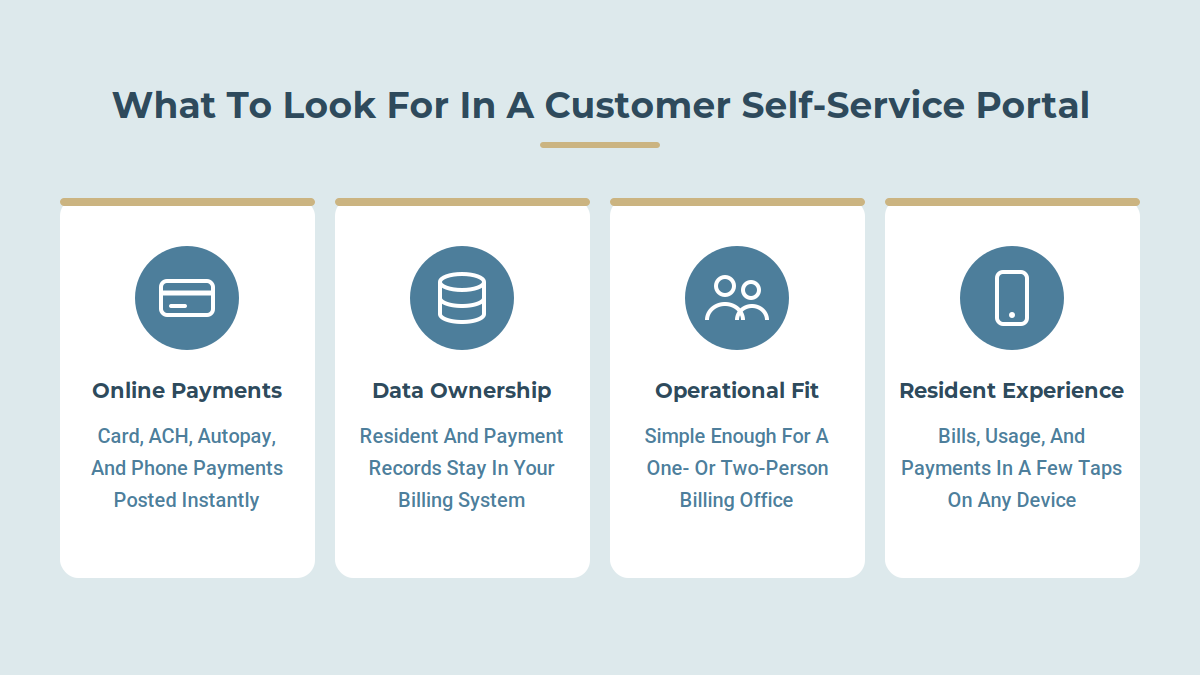
1. Online Payments
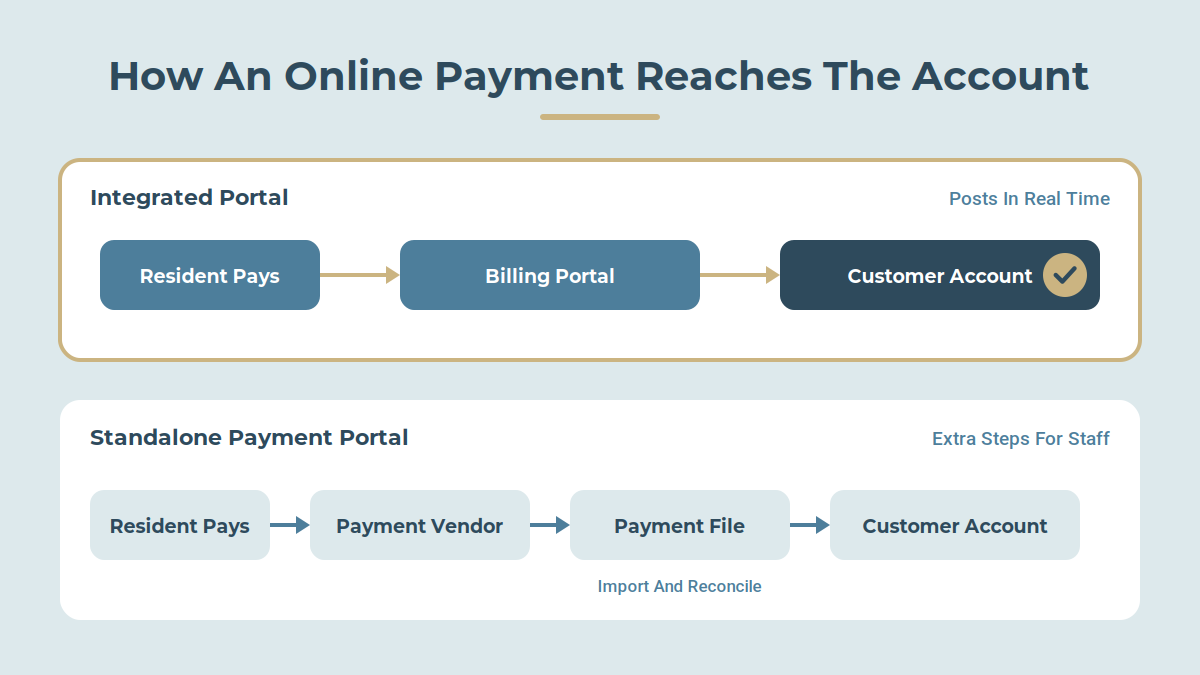
The portal should accept credit card, debit card, and ACH or e-check payments, support autopay, and offer phone (IVR) payments for residents who prefer not to log in. Most important, payments should post to the customer account in real time. When a portal runs through a separate gateway, staff often end up matching payment files to accounts by hand each day.
2. Data Ownership
Your customer records, usage history, and payment history belong to your utility. Ask each vendor where the data lives, whether you can export it in full at any time, and what happens to it if you leave. Portals operated by a third-party payment company can hold resident data outside your billing system, which makes reporting harder and switching vendors riskier.
3. Operational Fit
A small utility with one or two billing clerks needs a portal that works out of the box, not one that requires a system administrator. Look for:
- A portal that shows residents the same balance and history your staff sees
- Service requests submitted online that land directly in your workflow
- Pricing and implementation sized for your account count, not a large water authority's
- Hands-on onboarding and support, ideally with optional services like call center and bill printing
4. Resident Experience
Residents should be able to view current and past bills, see usage history, update contact details, enroll in paperless billing, and pay in a few clicks from a phone. The easier the portal is to use, the faster adoption grows and the more phone and counter traffic drops.
Municipal Utility Portals at a Glance
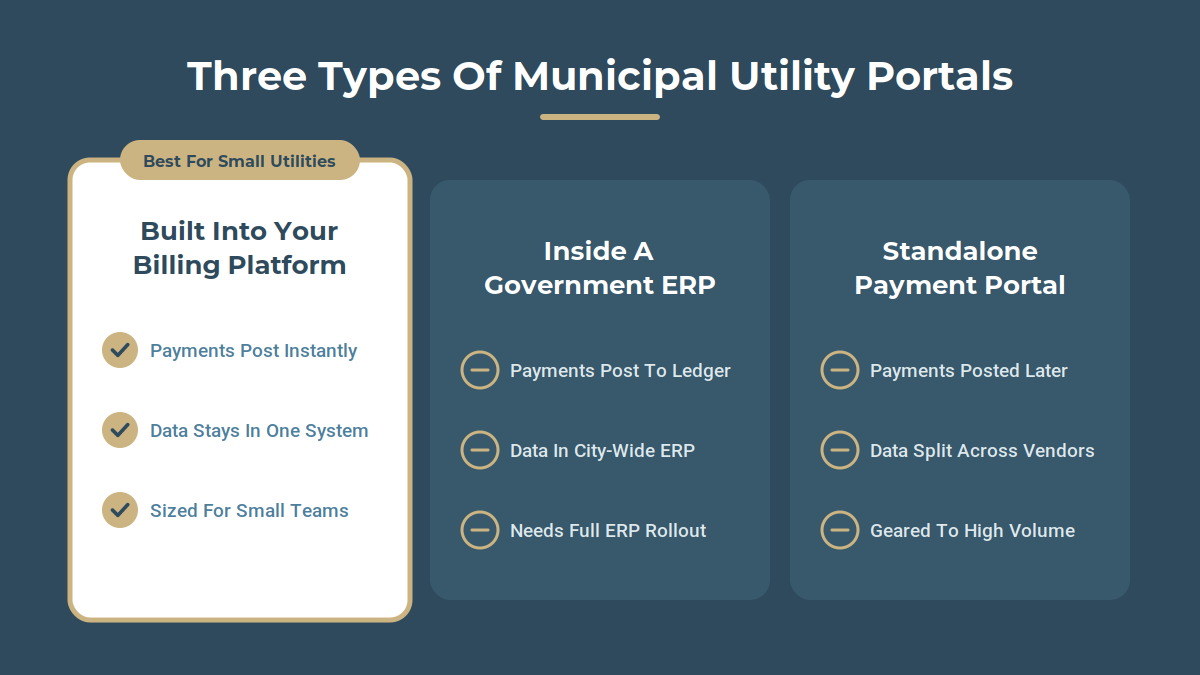
Small utilities usually choose between three kinds of portal: one built into a utility billing platform, one inside a broader government ERP, or a standalone payment portal layered on top of an existing billing system.
|
Portal |
Type |
Online Payments |
Where Your Data Lives |
Best Fit |
|---|---|---|---|---|
|
MuniBilling |
Portal built into utility billing platform |
Card, ACH, autopay, IVR; posts to the account in real time |
In the same system your billing staff uses |
Small and mid-sized utilities (10 to 50,000 accounts) that want billing, portal, payments, and optional managed services from one partner |
|
GovSense |
Portal inside a government ERP built on Oracle NetSuite |
Payment processing tied to the general ledger |
Inside the city-wide ERP |
Cities replacing finance, permitting, and billing systems all at once |
|
Muni-Link |
Portal built into utility billing platform |
E-billing and online payments |
In the billing system |
Utilities that want a billing-only platform with a basic portal |
|
Invoice Cloud |
Standalone bill presentment and payment portal |
Card, ACH, IVR, text-to-pay, digital wallets |
In the payment platform, with settled payments posted back to your billing system |
Larger utilities with high payment volume that keep a separate billing system |
Sources: MuniBilling, GovSense, GetApp: Muni-Link, FitGap: Invoice Cloud.

Portal-by-Portal Comparison
1. MuniBilling: Best Overall for Small and Mid-Sized Utilities
MuniBilling's Customer Portal 3.0 is part of the same cloud platform that runs billing, meter reading, service orders, and reporting. Residents can use it in a web browser or as a mobile app.
Online payments: Through Merchant as a Service, residents can pay by card or ACH, set up autopay, or pay by phone through IVR. Payments post to the customer's account as soon as they are made, so there is no daily payment file to reconcile. Processing is PCI DSS compliant and handled with payment partner Nuvei.
Data ownership: Portal activity, balances, usage, and payment history all live in the same system your billing staff works in. There is no second vendor holding a separate copy of your resident records.
Operational fit: MuniBilling was built from the ground up as a utility billing platform, not adapted from general accounting software. It is designed for 10 to 50,000 accounts, and utilities can add managed services such as call center support, bill printing, and lockbox as their needs grow. Paperless billing, autopay, and customizable broadcast notifications help raise portal adoption without extra staff time.
Watch for: MuniBilling focuses on utility billing rather than a full city ERP. Utilities that also want permitting and code enforcement in the same system would pair it with their existing finance tools.
2. GovSense: Best for Cities Replacing Their Whole ERP
GovSense runs utility billing as one module of a government resource planning platform built on Oracle NetSuite, alongside accounting, permitting, and code enforcement. Utility payments post straight to the general ledger.
Watch for: The value comes from adopting the full platform. For a utility that only needs a better billing system and portal, an ERP replacement is a much larger project, budget, and change for staff.
3. Muni-Link: A Billing-Focused Alternative
Muni-Link is a cloud utility billing system for municipalities and authorities. Its portal lets customers receive e-bills, make payments, and view usage and payment history.
Watch for: Muni-Link is primarily a software product. Utilities that want outsourced help with call handling, bill printing, or lockbox processing should confirm what services are available.
4. Invoice Cloud: Best for High-Volume Payment Processing
Invoice Cloud is a standalone bill presentment and payment platform used by many utilities and municipalities. It offers a wide range of payment channels, including text-to-pay and digital wallets.
Watch for: Because it sits on top of your billing system rather than inside it, resident data is split across two vendors, and settled payments have to post back to your system of record. Its pricing and feature set are generally geared toward larger organizations with high transaction volumes.

What MuniBilling’s Portal Looks Like Day to Day
Feature lists only tell part of the story. Here is how the portal helps in the everyday situations small utility offices know well.
A Resident Wants to Pay Now, Not Create an Account
Account registration is one of the most common reasons residents call the office. They forget a password, can’t find their account number, or just don’t want another login. With MuniBilling, residents don’t have to register to pay. They can go to the portal, enter their account number, and pay in a minute or two.
The resident gets a fast, simple payment, and the utility gets paid without a clerk spending ten minutes on the phone walking someone through setup. Residents who want more, such as usage history, paperless billing, or autopay, can register later on their own schedule.
The Morning After a Due Date
Due dates bring a wave of payments. When the portal runs through a separate payment vendor, the next morning often starts with downloading a payment file and matching it to accounts. With MuniBilling, portal payments post to each account as they are made, so staff start the day with balances that are already current.
A Resident Calls Anyway
Some residents will always pick up the phone. Because the portal shows the same balance and history your staff sees, the clerk and the resident are looking at the same numbers. For residents who would rather not talk to anyone, IVR phone payments let them pay any time, including nights and weekends.
The Office Needs to Reach Everyone at Once
When there’s a main break, a rate change, or a holiday closure, broadcast notifications let staff send one message to residents instead of fielding the same question all day.
The Billing Office Is Short-Staffed
In a one- or two-person office, a vacation, a sick day, or a busy season can stall everything. Optional managed services like call center support, bill printing, and lockbox processing can take routine work off the team, so residents get the same service even when the office is stretched thin.
Why MuniBilling Is the Best Fit for Small Utilities
MuniBilling combines a utility-specific billing platform, a built-in customer self-service portal, integrated online utility payments, and optional managed services from a single partner. For a small utility, that combination solves the problems the other approaches leave behind:
- No reconciliation gap. Payments made in the portal post to the account in real time, so staff are not matching payment files to accounts every morning.
- Pay without registering. Residents can make a one-time payment with just their account number, which cuts down on registration help calls.
- One home for your data. Resident, usage, and payment records stay in your billing system instead of being split across a payment vendor.
- Sized for your team. The platform is built for 10 to 50,000 accounts and is simple enough for a one- or two-person billing office to run.
- Help when you need it. Call center, bill printing, lockbox, and merchant services can be added as needed, so a small staff can serve residents like a much larger utility.
- Support your staff can count on. Reviewers on Capterra rate MuniBilling's customer support 4.9 out of 5, and implementation, training, and a dedicated Client Success Manager come standard.
Small utilities do not need the largest platform on the market. They need the one that makes online payments easy for residents and keeps the back office simple for staff, and that is what MuniBilling is built to do.
Choose the Portal That Fits Your Utility
The right customer self-service portal makes online utility payments easy for residents, keeps your data in your hands, and fits the size of your team. For most small and mid-sized municipal utilities, that means a portal built into the billing platform itself.
See how MuniBilling's Customer Portal, integrated payments, and managed services work together. Request a demo to walk through your current billing and payment process with our team.
Frequently Asked Questions
Which customer self-service portal suits small municipal utilities needing online payments?
A portal built into the utility billing system is usually the best fit, because payments post to accounts in real time and no separate vendor holds your data. MuniBilling offers this for utilities with 10 to 50,000 accounts, along with optional managed services for small teams.
What is a municipal utility portal?
A municipal utility portal is a secure website or mobile app where residents can view bills, check usage, update account details, and make online utility payments without calling or visiting the utility office.
Do residents need to create an account to pay a utility bill online?
Not with MuniBilling. Residents can make a one-time payment using their account number, and register later if they want features like autopay, paperless billing, or usage history.
Should a small utility use its billing vendor's portal or a third-party payment portal?
A billing vendor's built-in portal keeps payments and resident data in one system, which reduces reconciliation work. A third-party digital payment portal can add extra payment channels but splits data across two vendors and often costs more for small payment volumes.
Who owns the data in a customer self-service portal?
The utility should always own its customer, usage, and payment data. Before signing, ask where the data is stored, whether you can export all of it at any time, and what happens to it if you change vendors.
How does a customer portal help small utility management?
Every bill paid or question answered in the portal is one less phone call, counter visit, or check processed by hand. For a utility with one or two billing clerks, higher portal adoption frees up hours each week for higher-value work.

Schedule a personalized live demo of the MuniBilling platform today and explore how AI-driven workflow orchestration, operational intelligence, and governed automation can transform your utility billing operations.