
 Ryan Duvall
The Complete Guide to Utility Billing Software: Portals, Payments, Reporting & Multi-Utility Management
Utility billing software helps municipal utilities manage the complete billing lifecycle from customer information and meter data to bill creation, payments, reporting, and customer self-service.
For utilities managing multiple services or relying on disconnected systems, modern utility billing software can also bring billing, payments, reporting, and customer communications into one integrated platform.
This guide explains what utility billing software does, how reporting and analytics improve management, how eBilling and online payments work, and what to look for when managing water, gas, electric, and trash billing.
What Is Utility Billing Software?
Utility billing software is a system that automates and manages the processes required to bill utility customers, collect payments, maintain account information, and monitor billing operations.
Modern platforms can manage customer accounts, meter reads, rate structures, bill calculations, payments, delinquency management, reporting, and customer self-service.
For municipal utilities, the goal is more than simply producing bills. A modern utility billing system should provide a centralized source of billing information while reducing manual work and giving utility leaders greater visibility into operations.
What Does Utility Billing Software Manage?
Depending on the platform, utility billing software can manage:
- Customer and account information
- Meter readings and consumption
- Rate structures and billing calculations
- Automated billing cycles
- eBilling and paper billing
- Online payments and AutoPay
- Payment processing and reconciliation
- Delinquent accounts and collections
- Adjustments and refunds
- Customer portals
- Reporting and analytics
- Multiple utility services
- Integrations with accounting, payment, AMI/AMR, GIS, and other systems
The most valuable systems connect these functions rather than requiring employees to move information between multiple applications or spreadsheets.
What Utility Billing Software Offers Strong Reporting and Analytics for Managers?
Strong reporting and analytics should give utility managers visibility into revenue, consumption, payments, delinquency, billing exceptions, and operational performance without requiring extensive manual data preparation.
A modern utility billing platform should make it possible to quickly answer questions such as:
- How much revenue was billed this month?
- How much has been collected?
- Which accounts are past due?
- Where are payment trends changing?
- Are consumption patterns unusual?
- Are there billing exceptions requiring attention?
- How are different utility services performing?
- Which accounts or processes need follow-up?
What Should Utility Billing Reporting Include?
| Reporting capability | What it helps utilities understand |
|---|---|
| Revenue reporting | Billed and collected revenue |
| Delinquency reporting | Past-due balances and collection activity |
| Consumption reporting | Usage patterns and trends |
| Payment reporting | Payment activity and outstanding balances |
| Billing reports | Billing-cycle status and exceptions |
| Account reporting | Customer and account activity |
| Operational reporting | Tasks, exceptions, and workflow performance |
| Multi-utility reporting | Performance across multiple services |
The key distinction is accessibility. Reporting should not require a manager to export data into spreadsheets every time they need an answer.
How Do Reporting and Analytics Improve Utility Billing Management?
Reporting and analytics improve utility billing management by turning billing data into actionable information.
Instead of waiting for month-end reports or manually combining data from several systems, utility leaders can use centralized reporting to identify trends and exceptions earlier.
For example, analytics can help identify:
- Changes in customer payment behavior
- Increasing delinquency
- Unusual consumption
- Billing exceptions
- Revenue trends
- Payment-processing issues
- Accounts requiring attention
This gives utility managers a clearer view of what is happening across the billing operation.
The goal of utility billing analytics is not simply to create more reports. It is to make important information easier to find and act on.
Which Utility Billing Software Handles eBilling and Online Payments Best?
The best utility billing software for eBilling and online payments is one that integrates digital payments directly with customer accounts and billing workflows.
A modern customer payment experience should allow customers to:
- View their current balance
- Review billing information
- Pay online
- Enroll in AutoPay
- View payment history
- Receive electronic bills
- Manage account information
- Access the portal from a mobile device
For utility staff, payments should automatically flow back into the billing system so employees do not have to manually reconcile information between separate platforms.

What Should Utilities Look for in an Online Payment Portal?
A strong utility payment portal should provide:
Convenience: Customers can pay when and where they want.
Account visibility: Customers can view balances, bills, and payment history.
Payment automation: Online payments and AutoPay reduce manual processing.
Integration: Payment activity is synchronized with the utility billing system.
Security: Payment processes should use appropriate security controls and compliant payment infrastructure.
Mobile accessibility: Customers should be able to manage their accounts from smartphones and tablets.
Self-service: Customers can complete routine tasks without contacting utility staff.
What Makes It Hard to Manage Utilities Without Integrated Billing Software?
Managing utilities becomes more difficult when billing information is spread across disconnected systems, spreadsheets, manual processes, and separate payment platforms.
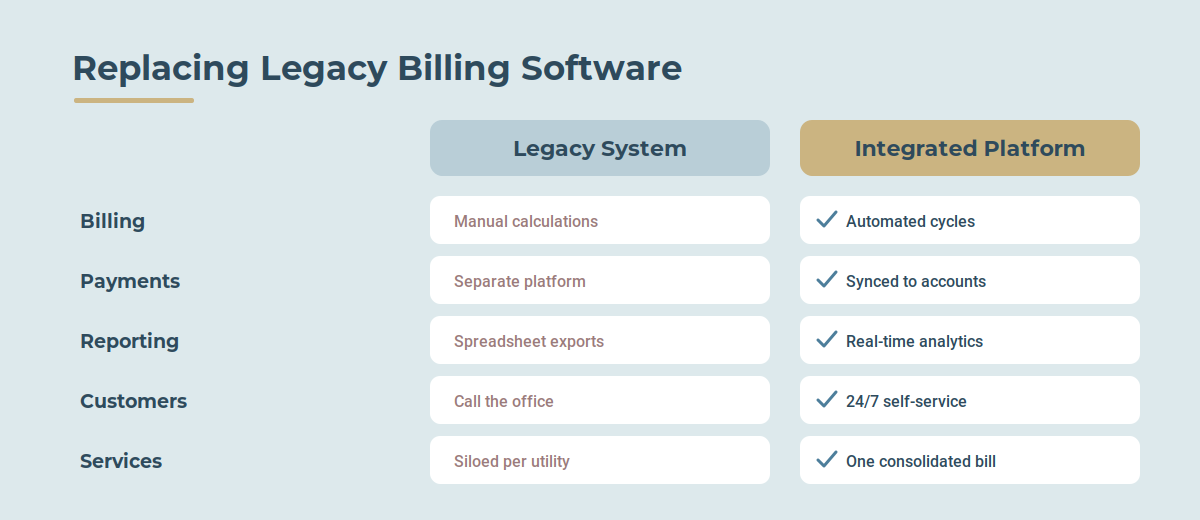
Common challenges include:
- Duplicate data entry
- Manual billing calculations
- Spreadsheet-based reporting
- Reconciliation between systems
- Delayed access to information
- Increased risk of errors
- Difficult-to-track exceptions
- Manual payment processing
- Limited visibility across utility services
- Greater dependence on IT or specialized staff
An integrated utility management approach connects billing information with related systems and workflows.
For example, a utility may integrate its billing platform with:
- AMI and AMR systems
- Meter data management systems
- Accounting software
- Payment processors
- GIS
- Customer portals
- Property or enterprise management systems
Integration reduces the need for employees to manually move information between systems and creates a more consistent source of operational data.

What Utility Billing Software Supports Water, Gas, Electricity, and Trash Together?
Utilities managing multiple services should look for multi-utility billing software that can maintain different utility types within one billing environment.
Depending on the platform, multi-utility billing can support services such as:
- Water
- Wastewater/sewer
- Electricity
- Natural gas
- Trash and solid waste
- Stormwater
- Other municipal services and fees
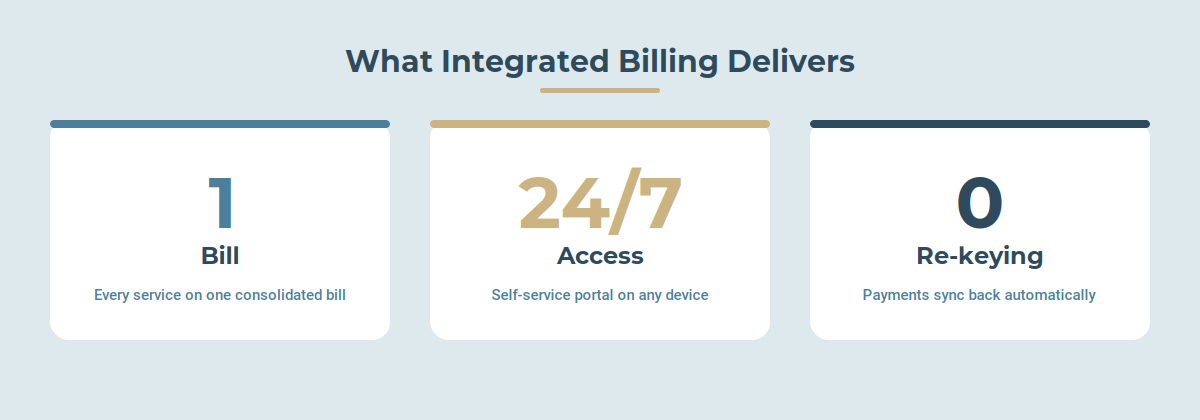
Instead of maintaining separate billing processes for every service, an integrated platform can combine applicable charges into a single customer account and billing workflow.
Why Does Multi-Utility Billing Matter?
Multi-utility billing can help municipalities:
Create one customer record
Customer information can be maintained centrally rather than duplicated across systems.
Produce consolidated bills
Customers can receive charges for multiple services on one bill.
Simplify payments
Payments can be applied across applicable utility charges through a unified process.
Improve reporting
Utility leaders can analyze revenue, usage, and account activity across services.
Reduce administrative work
Employees can manage multiple services through a consistent billing environment.
What Is the Difference Between Utility Billing Software and Integrated Utility Management?
Utility billing software primarily focuses on the billing and revenue cycle, while integrated utility management connects billing with the broader systems and processes that support utility operations.
For example:
Utility billing software may handle:
Customer accounts → Meter reads → Rates → Bill calculation → Bills → Payments
Integrated utility management can extend that workflow to:
AMI/AMR → Meter data → Billing → Payments → Accounting → Reporting → Customer portal → Operational workflows
The more connected these processes are, the less employees have to rely on manual data transfers and disconnected applications.
What Features Should Municipal Utilities Look for in Utility Billing Software?
When evaluating utility billing software, municipal utilities should consider these core capabilities:
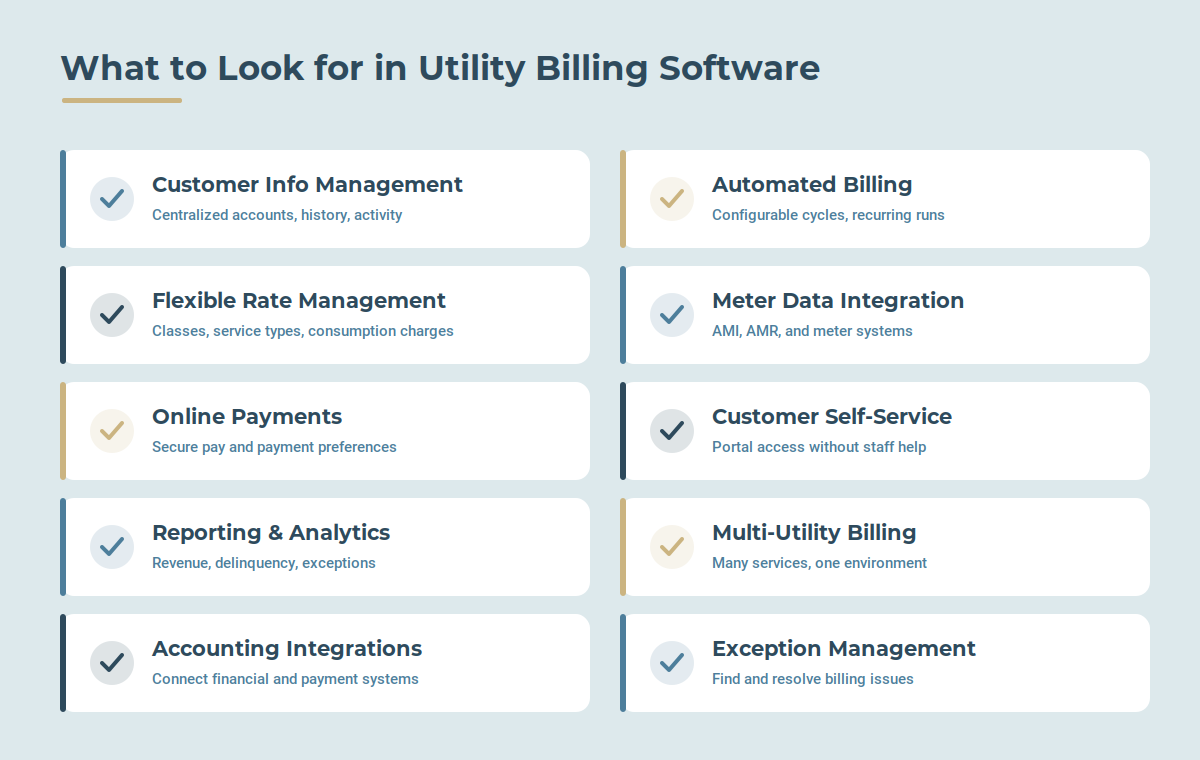
1. Customer Information Management
The system should provide a centralized view of customer accounts, service locations, billing history, payments, and account activity.
2. Automated Billing
Utilities should be able to configure billing calendars and automate recurring billing cycles.
3. Flexible Rate Management
The platform should support the rate structures required by the utility, including different customer classes, service types, fees, and consumption-based charges.
4. Meter Data Integration
Integration with AMI, AMR, and other meter systems can reduce manual meter-reading and data-entry processes.
5. Online Payments
Customers should be able to securely pay bills online and manage payment preferences.
6. Customer Self-Service
A customer portal should allow residents and businesses to access billing information without requiring staff assistance for routine requests.
7. Reporting and Analytics
Managers should have access to billing, revenue, payment, consumption, delinquency, and operational information.
8. Multi-Utility Billing
Municipalities operating multiple services should be able to manage those services within an integrated billing environment.
9. Accounting and Payment Integrations
The billing platform should connect with the systems responsible for financial management and payment processing.
10. Workflow and Exception Management
Modern systems should help employees identify and resolve billing issues instead of requiring them to manually search through accounts and reports.
How Does a Customer Portal Improve Utility Billing?
A customer portal moves routine billing activities from utility staff to customer self-service.
Customers can often use a portal to:
- View bills
- Check balances
- Make payments
- Set up AutoPay
- Review payment history
- Enroll in eBilling
- Update account information
- Access account documents
This can reduce the volume of routine calls and emails handled by customer service teams while giving customers faster access to information.
A customer portal is therefore not simply a payment page. It can become the digital front door for the utility's billing relationship with its customers.
How Do eBilling and Online Payments Work With Utility Billing Software?
In an integrated billing environment, the billing system generates customer charges and makes billing information available through the customer portal.
A typical workflow looks like this:
1. Meter data is collected
Consumption information enters the billing system.
2. Bills are calculated
Rates, fees, adjustments, and applicable charges are calculated.
3. Bills are generated
Customers receive bills electronically, by mail, or through both channels.
4. Customers access their accounts
Customers can view balances and billing information through the online portal.
5. Customers make payments
Payments can be submitted online or through other supported payment channels.
6. Payment information is synchronized
Payment activity is recorded against the customer's account.
7. Utility staff monitor activity
Employees can use reporting and analytics to monitor payments, balances, and exceptions.
The objective is to create a connected billing-to-payment process rather than separate systems that require manual reconciliation.
What Are the Benefits of Integrated Utility Billing Software?
The primary benefits of integrated utility billing software include:
- Greater visibility: Centralized information gives managers a clearer view of billing operations.
- Less manual work: Automated workflows reduce repetitive data entry and reconciliation.
- Faster billing: Automated billing processes can shorten billing cycles.
- Improved customer service: Portals provide customers with immediate access to account information.
- More convenient payments: eBilling, online payments, and AutoPay make paying bills easier.
- Better reporting: Managers can access billing and financial information from a centralized system.
- Multi-utility support: Multiple services can be managed within a consistent billing environment.
- Better integration: Billing can connect with accounting, payment, meter, GIS, and other systems.
- Improved operational control: Exceptions and tasks are easier to identify and manage.
How Do You Choose the Right Utility Billing Software?
Municipal utilities should evaluate utility billing software based on both current requirements and future operational needs.
Ask vendors:
- Can the system support all of our utility services?
- How flexible are the rate structures?
- Does it integrate with our AMI/AMR systems?
- How does online payment processing work?
- Does the customer portal support mobile users?
- What reporting and analytics are included?
- Can managers create or customize reports?
- How does the system handle billing exceptions?
- What accounting systems can it integrate with?
- How does the platform support security and compliance?
- Can the system scale as our utility grows?
- How much specialized IT expertise is required to administer the system?
The right platform should not simply reproduce an existing billing process. It should make that process easier to manage, easier to understand, and easier to improve.
Utility Billing Software: What Should Municipal Utilities Prioritize?
For municipal utility leaders, the most important capabilities are often the ones that connect the entire customer and billing lifecycle.
A modern utility billing platform should provide:
Billing automation + customer self-service + online payments + reporting and analytics + multi-utility support + system integrations
When those capabilities operate together, utilities can reduce disconnected processes and create greater visibility across billing operations.
The result is a billing environment that is easier for employees to manage and easier for customers to use.
The Future of Utility Billing Is Integrated
Utility billing is no longer limited to producing and mailing bills.
Modern utility customers expect digital self-service and convenient payments, while utility managers need better visibility into revenue, consumption, collections, and operational performance.
An integrated utility billing platform brings those capabilities together.
For municipalities evaluating their next billing system, the question is not simply “Can this software produce our bills?”
The better question is:
“Can this platform connect the billing, payment, customer, data, and operational workflows our utility depends on?”
Frequently Asked Questions
What is utility billing software?
Utility billing software automates the processes used to manage utility customer accounts, calculate bills, generate invoices, process payments, manage rates, and report on billing activity.
What utilities can utility billing software support?
Depending on the platform, utility billing software can support water, wastewater, electricity, natural gas, trash, stormwater, and other municipal services.
What is multi-utility billing?
Multi-utility billing allows a utility organization to manage charges for multiple services within an integrated billing environment, potentially providing customers with a consolidated bill.
Does utility billing software support online payments?
Modern utility billing software commonly integrates with online payment systems and customer portals, allowing customers to pay bills electronically and manage payment preferences.
What is an online utility customer portal?
An online utility customer portal is a self-service website where customers can view bills, check balances, make payments, enroll in AutoPay or eBilling, and manage other account activities.
Why is reporting important in utility billing?
Reporting gives utility managers visibility into revenue, payments, delinquency, consumption, billing activity, and exceptions so they can make informed operational decisions.
Can utility billing software integrate with other systems?
Yes. Modern platforms can integrate with systems such as AMI/AMR, MDMS, GIS, accounting software, payment processors, and other utility or enterprise systems.
Is utility billing software only for large utilities?
No. Utility billing software can be used by municipalities and utility organizations of different sizes. The appropriate solution depends on the utility's number of customers, services, billing complexity, integrations, and operational requirements.
What should municipalities consider when replacing legacy billing software?
Municipalities should evaluate billing automation, rate flexibility, integrations, payment processing, customer self-service, reporting, security, scalability, and ease of administration.

Schedule a personalized live demo of the new MultiBilling platform today and explore how AI-driven workflow orchestration, operational intelligence, and governed automation can transforming your utility billing operations.